Check Pause and Resume Billing
After a paused membership resumes, use billing history to explain what changed and when the member is charged next.
1. Open Billing History
Open the member account, select Membership, then scroll to Billing History.
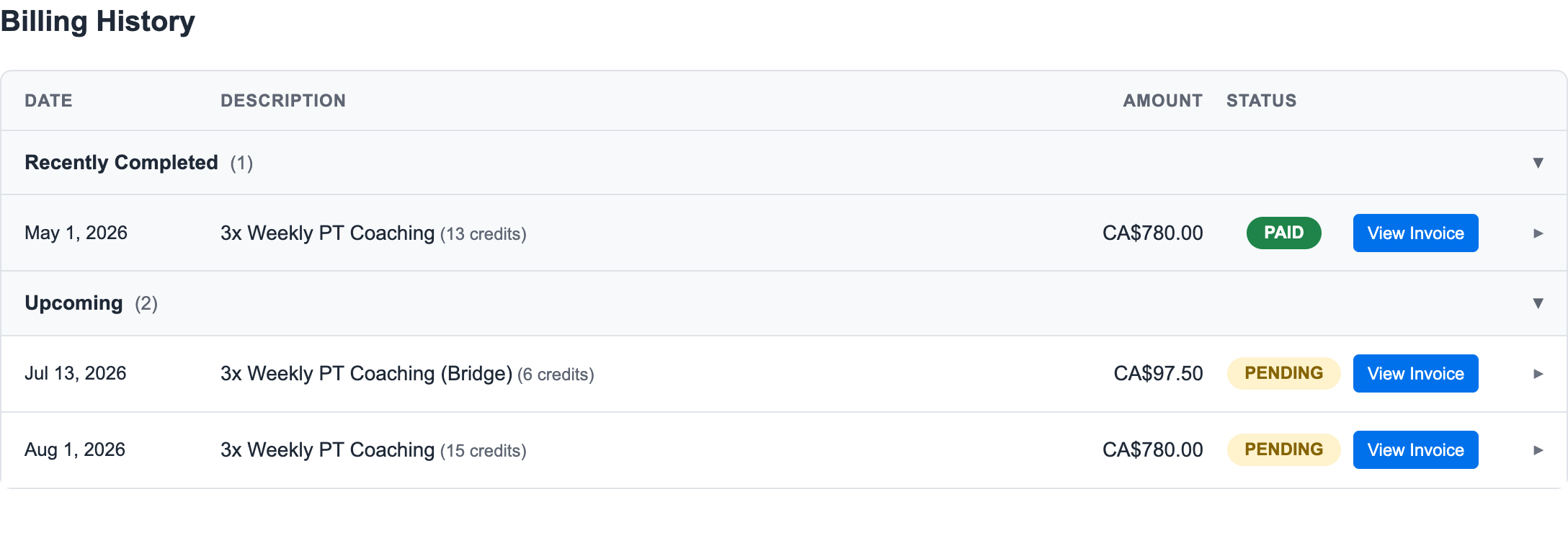
2. Read the Invoice Pattern
In this resumed fixed-weekly example:
- The original May invoice is PAID.
- The July 13 invoice is a smaller Bridge invoice.
- The August 1 invoice is the next regular monthly invoice.
The bridge invoice exists because the member resumed between normal billing anchors. It covers the credits needed to reconnect the member's account to the regular fixed billing date.
3. Explain It to the Member
Use plain language:
"Your paid credits were preserved while you were paused. This bridge invoice covers the credits between your resumed account and your normal monthly billing date. After that, your regular monthly billing continues."
What Staff Should Check
- The resumed membership is ACTIVE.
- Paid invoices still show as paid.
- The bridge invoice amount makes sense for the credits provided.
- The next regular invoice returns to the normal fixed billing date.
For the full pause/resume behavior, see Pausing and Resuming Memberships.
Ready to streamline your gym?
Start managing bookings, personal training, and memberships in minutes.
Start Your Free Trial →No credit card required