Pausing and Resuming Memberships
"I'm going to be traveling for a month."
"I hurt my knee and can't train for a while."
"Things are crazy at work right now. Can I take a break?"
You hear this all the time. Life happens, and members need flexibility. The question is: what happens to their credits? Their booked sessions? Their billing?
That's what the pause system handles—and it picks up exactly where they left off.
What Happens When You Pause
Let's say Sarah has a weekly PT membership. She's going on a 3-week trip and wants to pause.
Sarah's current situation:
- 3 sessions per week
- 5 credits remaining this billing cycle
- 2 sessions booked (one tomorrow, one next week)
When you hit pause:
-
Credits are preserved. Sarah's 5 credits don't disappear. They're saved.
-
Booked sessions are cancelled. Those 2 appointments come off the calendar. (But the 24-hour rule applies—more on that in a second.)
-
Billing stops. Sarah won't be charged while she's paused.
-
Everything is documented. Her invoice shows exactly what happened and when.
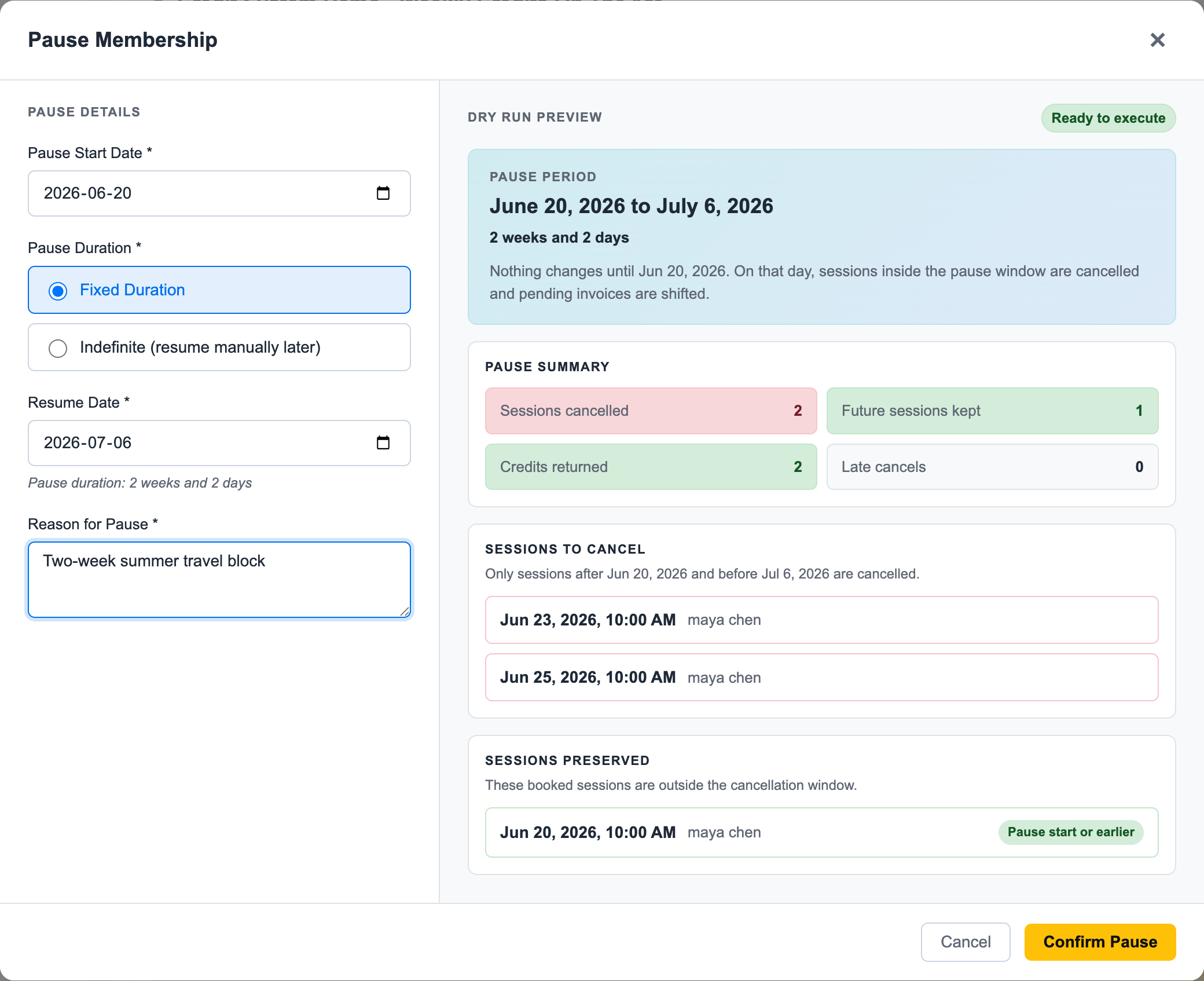
Before staff confirm the pause, they see the effect on sessions, credits, and future invoices. That makes the conversation with the member clearer because the system shows the consequences before anything is changed. The fixed-duration option is useful for planned travel, work blocks, and scheduled medical breaks. Staff choose the start date and resume date, add a reason, and review the dry run before confirming. In Sarah's example, two future sessions fall inside the pause window and two credits are returned; the session on the pause boundary is preserved.
Step-by-Step Workflows
If you want the practical staff workflow, start here:
Those pages use screenshots from the demo gym and show the actual membership card, pause dry run, resume confirmation, and bridge invoice history.
Fixed Pause/Resume Behavior
For fixed weekly memberships billed monthly, Easy Fitness Booking keeps weekly credit entitlement and monthly billing aligned.
When staff pause a fixed weekly membership, the system can:
- Split the active credit bucket at the pause boundary
- Preserve unused paid credits
- Cancel sessions inside the pause window
- Keep sessions outside the pause window
- Delete or shift pending invoices so the member is not billed for paused time
- Record the pause reason and system changes on the account
When staff resume, the system can:
- Restore paused credits
- Extend credit dates by the pause duration
- Recalculate the next billing point
- Create a bridge invoice when the member resumes between normal billing dates
- Return future invoices to the normal fixed billing date
That is why a resumed member may show a smaller bridge invoice first, followed by the regular monthly invoice.
The 24-Hour Rule Still Applies
Here's something important: pausing doesn't override the session cancellation policy.
Sarah's 2 booked sessions:
- Tomorrow's session (less than 24 hours away): Cancelled, but credit NOT returned
- Next week's session (more than 24 hours away): Cancelled, credit returned
Why? The trainer already committed time for tomorrow's session. They may have turned down other clients. Pausing the membership doesn't change that.
Sarah's final credit count: 6 (her original 5, plus 1 returned from next week's cancelled session)
All 6 credits will be waiting for her when she comes back.
Emergency Override
If Sarah's pausing because she just got diagnosed with something serious—not because of a planned vacation—you can override the 24-hour rule and return all credits. Use your judgment. See Session Handling for details on the override option.
What Happens When You Resume
Three weeks later, Sarah's back. You resume her membership.
The system:
-
Extends all credits. Whatever validity period her credits had, it shifts forward by the pause duration. If credits were valid through January 31st before a 21-day pause, they're now valid through February 21st.
-
Restarts billing. For fixed-weekly memberships, the system keeps the member aligned to the normal fixed billing date. If the member resumes between billing anchors, it can create a smaller bridge invoice first.
-
Creates new cycles. Future billing periods are set up automatically so the member returns to the normal monthly rhythm.
-
Documents everything. The invoice notes the resume, the extension period, any bridge invoice, and the next regular billing date.
Credit Extension Example
Before pause (January 15):
Week of Jan 12-18: 2 credits remaining
Week of Jan 19-25: 3 credits (not yet started)
Week of Jan 26-Feb 1: 3 credits (not yet started)
Pause duration: 30 days
After resume (February 14):
Week of Feb 11-17: 2 credits (shifted from Jan 12-18)
Week of Feb 18-24: 3 credits (shifted from Jan 19-25)
Week of Feb 25-Mar 3: 3 credits (shifted from Jan 26-Feb 1)
Sarah gets exactly what she paid for—just shifted forward in time. No credits lost, no credits expired during the pause.
Pause Options
Set an End Date
Sarah knows she's traveling January 15 to February 5. Set the pause with those dates:
- Pause from: January 15
- Pause until: February 5
- Duration: 21 days
Great for planned absences—vacations, scheduled surgeries, work trips.
Leave It Open
Sarah hurt her knee and doesn't know when she'll be back. Leave the end date open:
- Pause from: January 15
- Pause until: TBD
- Resume: When Sarah's ready
When she calls to say she's recovered, you resume manually. Credits extend based on actual pause duration.
What Gets Documented
Every pause and resume adds notes to Sarah's invoice. Your staff can see exactly what happened:
Pause note:
[PAUSED 2025-01-15] From 2025-01-15 to 2025-02-05.
Reason: Member vacation.
3 PT sessions cancelled, 2 credits returned.
Resume note:
[RESUMED 2025-02-05] Membership resumed after 21-day pause.
Credits extended by 21 days.
Next billing: 2025-03-01.
No guessing. No "what happened with this account?" The history is right there.
Billing During Pause
No Charges While Paused
- Automatic billing doesn't happen
- Any pending invoices for future periods are deleted
- Sarah isn't charged until she resumes
Billing After Resume
When Sarah comes back, the system figures out:
- When her extended credits expire
- Whether she needs a bridge invoice before the next fixed billing date
- When regular fixed-date billing should continue
- What future weekly credit buckets look like
It's all automatic. You don't have to manually reconfigure anything.
Why Resume Billing Is Credit-Based
You might wonder why the resume invoice is not calculated from raw calendar days.
The answer is that fixed-weekly memberships are credit-based. The system first calculates the weekly credits the member is actually receiving, then prices the bridge period from those credits.
At signup, the first invoice is prorated from the credits granted before the first full billing cycle.
At resume, the member may still have saved paid credits from before the pause. Those credits stay available. If additional credits are needed to carry the member back to the normal billing anchor, the bridge invoice is priced from the credits granted in that bridge window.
Fair for everyone. The member keeps what they paid for, avoids billing during the pause, and only pays for new credits when the system grants them.
Example Timeline
Jan 1:  Sarah billed $300 for January (12 credits)
Jan 15: Sarah uses 4 credits, then pauses
        - Pending February invoice deleted
        - 8 credits preserved

Feb 5:  Sarah resumes (21-day pause)
        - 8 credits extended
        - Bridge invoice may cover credits needed before the next fixed billing date

Mar 1:  Regular fixed-date billing resumes ($300 for March)
Sarah paid for 12 credits. She paused with 8 remaining. She comes back and uses those saved credits first. If the resume date creates a gap before the next regular billing anchor, the system creates a bridge invoice for the extra credits granted in that gap. Then normal billing kicks in on the fixed date.
Talking to Members
When Pausing
"I've paused your membership starting today. Your 8 remaining credits are saved. When you're ready to come back, just let us know and we'll extend everything by however long you were away."
When Resuming
"Welcome back! I've reactivated your membership. Your saved credits have been extended, and the system has reconnected your billing to your normal monthly date. If there is a bridge invoice, it only covers the credits added between now and that normal billing date."
Keep it simple. They don't need to understand the mechanics—they just need to know their credits are safe and when they're being charged.
Pause vs. Cancel: When to Use Which
| Situation | Recommendation |
|---|---|
| Short trip (1-4 weeks) | Pause |
| Medical leave (expects to return) | Pause |
| "Not sure if I'll be back" | Pause (can always cancel later) |
| Moving away permanently | Cancel |
| Unhappy, wants out | Cancel |
| Needs a refund | Cancel |
When in doubt, pause. It's easy to cancel a paused membership later, but you can't un-cancel.
Edge Cases
Pausing on Day One
What if someone signs up and immediately needs to pause? (It happens—life is unpredictable.)
Works fine. Credits created at signup are preserved and will extend when they resume.
Multiple Pauses
Members can pause more than once, but members can't pause their own memberships. Pauses are managed through the admin side of the software. The member requests it, and staff executes it. Each pause is tracked separately, and credits extend correctly each time.
We also recommend setting a policy to limit the number of pauses — whether it's 1 or 2 per year. This gives genuine flexibility for vacations and emergencies while preventing abuse.
Resuming Early
Sarah set her pause to end February 5, but she's back on January 28 and wants to resume early. No problem—resume now, and credits extend based on actual pause duration (13 days instead of 21).
Related Topics
- Cancellation Policies - When members want to fully cancel
- Session Handling - How the 24-hour rule works
- Invoice Audit Trails - What gets documented
Ready to streamline your gym?
Start managing bookings, personal training, and memberships in minutes.
Start Your Free Trial →No credit card required