How Booked Sessions Are Handled
It's 6 PM and your phone buzzes. "Hey, I can't make tomorrow's 8 AM session."
This happens constantly. Members cancel, reschedule, forget to show up, or need to pause their membership entirely. Each situation affects your trainers differently, and the system needs to handle it fairly.
Here's how it all works.
The 24-Hour Rule
This is the foundation of session management. It's simple:
More than 24 hours notice? The member gets their credit back. The trainer's slot opens up for someone else.
Less than 24 hours notice? The credit is forfeited. The trainer still gets paid.
Why? Because your trainer already turned down other clients for that slot. They prepared for the session. They might have driven to the gym specifically for that appointment. It's not fair to pull the rug out from under them at the last minute.
| When They Cancel | Credit Returned? | Trainer Paid? |
|---|---|---|
| Day before or earlier | Yes | No |
| Same day / less than 24hrs | No | Yes |
When a Member Cancels a Session
Cancelling With Enough Notice
Lisa texts at 3 PM on Monday to cancel her Wednesday 10 AM session. That's about 43 hours notice.
What happens:
- Session is removed from the calendar
- Lisa's credit goes back to her account
- The trainer's slot opens up
- No late cancellation on her record
Everyone's happy. Lisa can rebook when she's ready.
Cancelling Too Late
Now imagine Lisa texts at 9 PM Tuesday night, less than 12 hours before her Wednesday 10 AM session.
What happens:
- Session is cancelled (she's not coming)
- Credit is not returned (late cancellation)
- Trainer gets paid for the session
- "Late Cancel" appears on her session history
Lisa loses that credit, but the trainer isn't penalized for her last-minute change.
The Override: When Rules Should Bend
Sometimes the 24-hour rule shouldn't apply. That's why we built an override.
When to Use It
Trainer cancelled on the member: Your trainer got sick and cancelled Lisa's session with 2 hours notice. Obviously Lisa shouldn't lose her credit.
Emergency situations: Lisa calls from the hospital. Her kid broke their arm. She can't make the session. This isn't a "forgot" or "don't feel like it." It's a genuine emergency.
Your mistake: Someone at the front desk booked Lisa at the wrong time, and now she can't make it. That's on you, not her.
Goodwill gesture: Lisa's been a loyal member for 3 years. She's late-cancelling for the first time ever because something came up at work. Maybe this one's worth eating.
How It Works
When editing a booked PT session inside 24 hours, the booked-session modal shows Refund PT credit (within 24 hours). Check that box before clicking Cancel Booking when you want to make an exception.
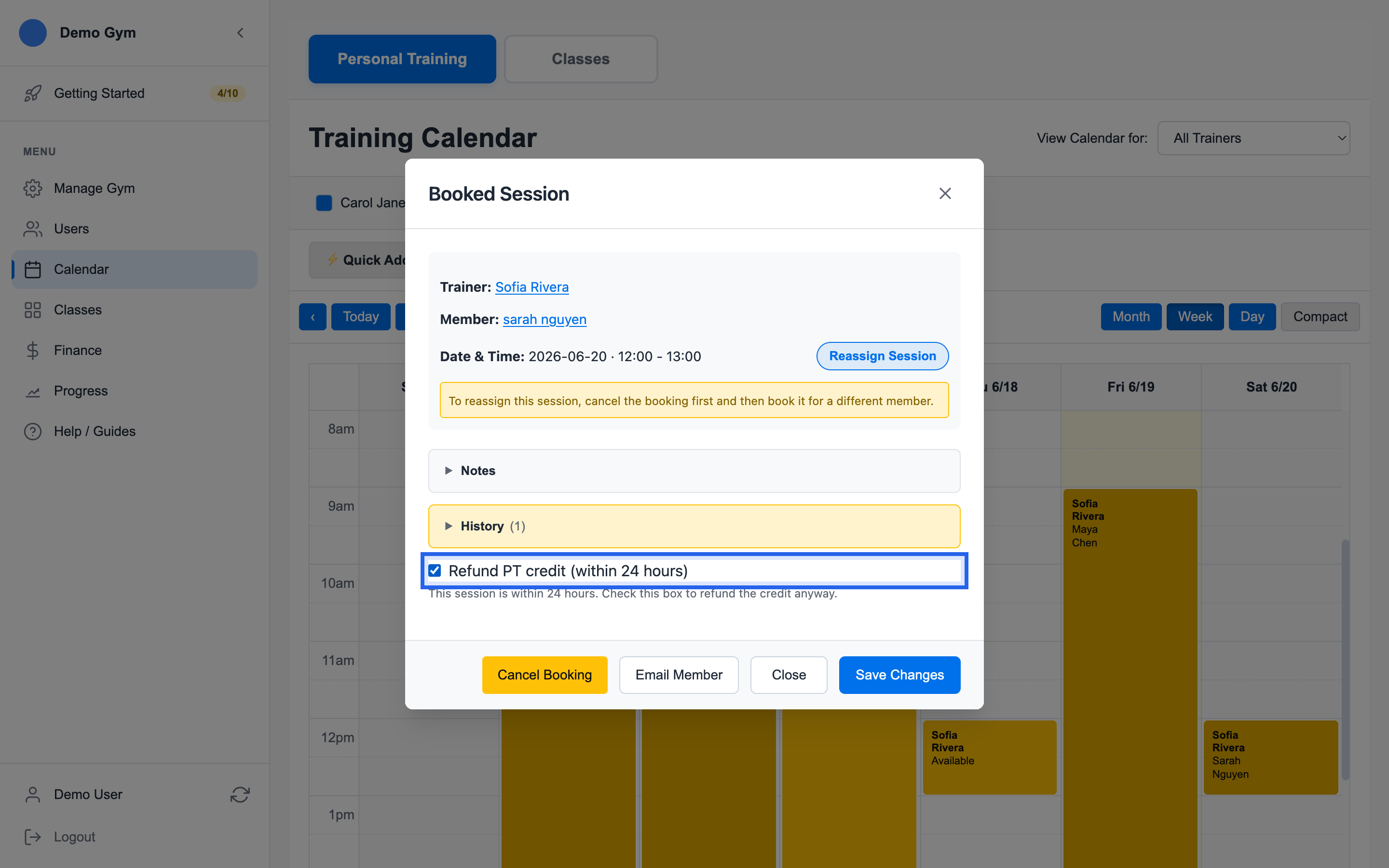
With that selected:
- Lisa gets her credit back (even though it's last-minute)
- The trainer's slot is freed
- The session is removed from trainer payroll
- A note documents that you overrode the policy
Who Can Override?
- Gym owners
- Admins
- Trainers (for their own sessions only)
Regular members can't override—they have to call and ask. This keeps the policy meaningful while allowing flexibility when it matters.
No-Shows
It's 10:15 AM. Lisa's session was at 10:00. She's not here and hasn't called.
Marking a No-Show
After the session time passes, mark it as a no-show:
What happens:
- Session status changes to "No-Show"
- Lisa's credit is forfeited
- Trainer gets paid (they were there, ready to work)
- "No Show" appears on Lisa's history
No-Show vs. Late Cancel
Both protect the trainer, but there's a difference:
| Scenario | Status | What It Means |
|---|---|---|
| Lisa cancels 2 hours before | Late Cancel | She told you she wasn't coming |
| Lisa just doesn't show up | No-Show | She didn't communicate at all |
The distinction helps you spot patterns. A member with frequent late cancels might need a conversation about scheduling. A member with frequent no-shows might need a different conversation entirely.
What Your Calendar Shows
Your staff sees clear visual indicators:
| Color | Status | What It Means |
|---|---|---|
| Blue | Booked | Session scheduled, member expected |
| Green | Completed | Session happened |
| Amber/Orange | Late Cancel | Member cancelled last-minute |
| Red | No-Show | Member didn't show up |
At a glance, you can see how the week went. Lots of green? Great. Lots of red? Time to follow up with some members.
Trainer Payroll Integration
Here's why tracking late cancels and no-shows matters beyond member management: your trainers need to get paid fairly.
At payroll time, the system calculates:
Trainer: Marcus
Pay Period: Jan 1-15

Completed Sessions:    24 × $40 = $960
Late Cancellations:     2 × $40 = $80
No-Shows:               1 × $40 = $40
────────────────────────────────────────
Total Owed:                      $1,080
Marcus showed up ready to work for 27 sessions. 24 happened, 2 were late-cancelled, 1 was a no-show. He gets paid for all 27 because he did his part.
Sessions cancelled with proper notice (more than 24 hours) don't appear here—those slots were freed up and possibly filled by other clients.
During Membership Pause
When you pause a membership, the system handles booked sessions automatically. But the 24-hour rule still applies.
Example: Pausing on Monday at 2 PM
Lisa has three sessions booked:
- Tuesday 10 AM (20 hours away) — Within 24 hours
- Wednesday 3 PM (49 hours away) — More than 24 hours
- Friday 9 AM (91 hours away) — More than 24 hours
What happens:
- Tuesday: Cancelled, credit NOT returned (too close)
- Wednesday: Cancelled, credit returned
- Friday: Cancelled, credit returned
Lisa loses one credit to the 24-hour rule, but the other two come back. The invoice documents exactly what happened:
[PAUSED 2025-01-20] From Jan 20 to Feb 20.
Reason: Member vacation.
3 sessions cancelled, 2 credits returned.
Emergency Override for Pause
If Lisa's pausing because she just got diagnosed with something serious, you can override and return all credits regardless of timing. Use judgment.
During Membership Cancellation
Different cancellation policies handle sessions differently:
Emergency Cancellation: All sessions cancelled, all credits returned. The 24-hour rule is waived.
48-Hour Policy: Sessions more than 48 hours out are cancelled and refunded. Sessions within 48 hours stay on the books—member can attend or forfeit.
Honor All Bookings: All sessions stay scheduled. Member attends everything they booked, then they're done.
See Cancellation Policies for the full breakdown.
When the Trainer Cancels
Different situation entirely. If your trainer cancels on a member:
- Credit is always returned to the member (no 24-hour penalty)
- Trainer's slot is marked unavailable
- Session doesn't count toward trainer payroll
- Member gets notified and can rebook
The 24-hour rule protects trainers from member behavior. It doesn't protect them when they're the ones cancelling.
Best Practices
Communicate the Policy Upfront
At booking:
"Your session is confirmed for Tuesday at 10 AM. Just remember, if you need to cancel, let us know at least 24 hours ahead to keep your credit."
Members who know the policy rarely complain about it.
At a Late Cancellation
"I can cancel this for you, but since it's within 24 hours, you'll lose the credit and Marcus will still be paid for the time. Do you want to proceed, or would you rather try to make it?"
Give them the choice. Sometimes they'll find a way to show up.
When Using the Override
"Given what happened, I'm going to refund your credit as a one-time exception."
Frame it as exceptional. You don't want members expecting overrides every time.
Watch for Patterns
Review your late-cancel and no-show reports monthly. If someone has 4 late cancels in 6 weeks, that's a conversation—maybe they need a different time slot, or maybe they're not committed enough for PT right now.
Summary
| Situation | Credit | Trainer Paid |
|---|---|---|
| Cancel 24+ hours ahead | Returned | No |
| Cancel under 24 hours | Forfeited | Yes |
| No-show | Forfeited | Yes |
| Trainer cancels on member | Returned | No |
| Emergency override | Returned | No |
The system tracks everything automatically. Your job is knowing when to apply the rules and when to make an exception.
The Principle Behind It All
The session handling rules follow one idea: if the trainer committed their time, they earned their pay.
A trainer who blocks 10 AM on Tuesday turned down other clients for that slot. They may have arranged childcare, commuted to the gym, or prepared a specific workout plan. When the member cancels at the last minute or doesn't show up, the trainer still did their part.
That's why late cancellations and no-shows count toward payroll. The member loses the credit because they didn't hold up their end. The trainer gets paid because they did.
Sessions cancelled with proper notice are different — the trainer has time to fill the slot or adjust their day. No penalty to the member, no payment to the trainer. Everyone had enough warning to adapt.
Related Topics
- Pausing and Resuming - How pauses affect sessions
- Cancellation Policies - Full membership cancellation options
- Manual Credit Bucket Adjustments - How to add a make-up credit while preserving a late-cancel record
- Smart Refund Handling - How credits return to the right bucket
- Invoice Audit Trails - Everything that gets documented
Ready to streamline your gym?
Start managing bookings, personal training, and memberships in minutes.
Start Your Free Trial →No credit card required