Credit Tracking & Transparency
"I thought I had more sessions left."
Every gym owner has heard this. The member is sure they have credits. Your system says otherwise. Now you're both digging through records, trying to figure out what happened.
With traditional gym software, this is a nightmare. Credits are just a number. Add some, subtract some. No history. No trail. No way to explain what happened.
We do it differently.
Every Credit Knows Where It Came From
In Easy Fitness Booking, credits aren't just a counter. Each credit is part of a "bucket" that knows:
- Which invoice created it — The specific purchase
- When it's valid — The exact week or period
- What it's worth — The price per session
- What happened to it — Used, expired, or still available
When that member calls to ask "where are my credits?" you can actually show them.
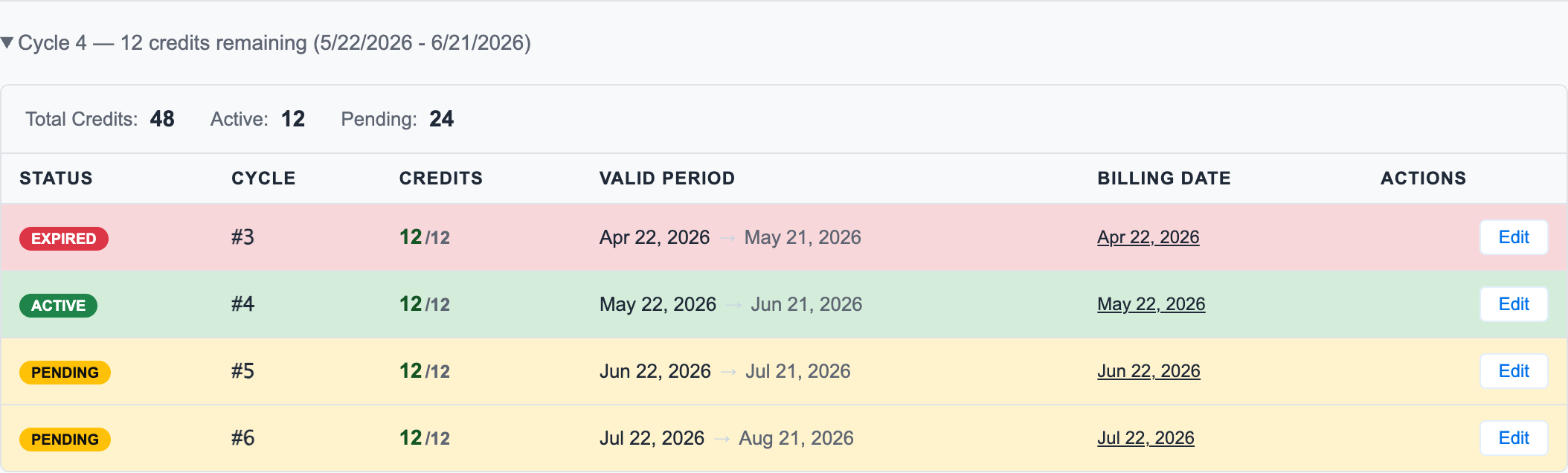
In the app, the credit detail is visible from the member's membership tab. Staff can see active, pending, and expired credit cycles without leaving the account.
For fixed-weekly memberships, that breakdown is especially useful because each week stays separate even when billing happens monthly.
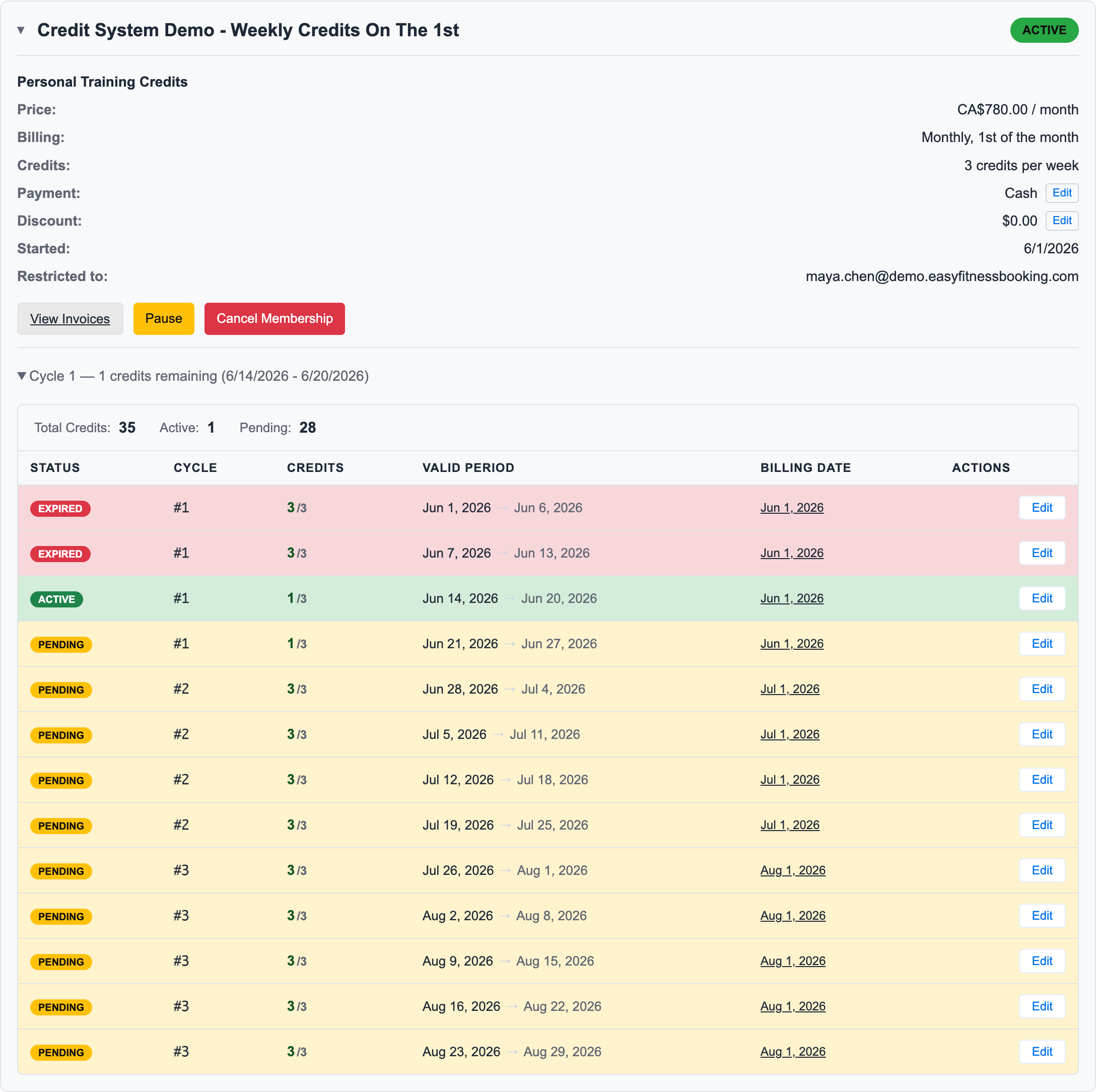
In this example, Sarah pays monthly on the 1st, but her credits are still granted week by week. Staff can see which buckets are expired, active, or pending, which invoice owns each bucket, and how many credits remain after booked and cancelled sessions.
How Buckets Work
Instead of a Number, You Get a Breakdown
Traditional system:
Member balance: 5 sessions
That's all you know. Where did they come from? When do they expire? What did they cost? Who knows.
Our system:
Active Credits for Sarah:

Weekly PT (Jun 14-20): 2 credits
├── Source: June 1 invoice (3x Weekly PT Coaching)
└── Value: $65 each

Weekly PT (Jun 21-27): 3 credits
├── Source: June 1 invoice (3x Weekly PT Coaching)
└── Value: $65 each

10-Pack Bonus: 4 credits
├── Source: Spring 10-pack purchase
└── Value: $75 each

Total: 9 credits (full traceability)
Now you can explain exactly what Sarah has, where it came from, and what each credit is worth.
When Sarah Books a Session
She picks Tuesday, June 16 at 10 AM with Maya. The system automatically uses a credit from her June 14-20 weekly bucket.
Booking: Tuesday, June 16 at 10:00 AM

Credit used from: Weekly PT (Jun 14-20)
├── Credits before: 3
├── Credits after: 2
└── Source invoice: June 1 invoice
No ambiguity. No "which credits got used?" questions. It's tracked.
What Gets Used First
Sarah has credits from multiple sources. When she books a session, which credits get used?
Expiring Credits Go First
The system uses the credits that expire soonest first:
- Credits expiring soonest are used first
- If expiration dates tie, weekly membership credits are used before one-time purchases
- If still tied, lower price credits are used first
Why This Matters
Sarah has:
- 2 weekly credits expiring June 20th
- 6 10-pack credits expiring August 31st
When she books, the system automatically uses the June weekly credits first. She doesn't accidentally let them expire while sitting on the 10-pack.
This isn't something she has to think about. The system handles it, and she can see which credits will be used before confirming.
Tracing Everything Back
Every credit connects to the invoice that created it. This matters when questions come up.
The Quick Lookup
Member calls: "I bought 10 sessions in April and I've only used 6. Why does it say I have 2?"
Traditional system: "Let me... check... um... I'm not sure. Let me ask my manager."
Our system:
April Purchase:
├── Sessions purchased: 10
├── Sessions used: 8 (with dates and trainer names)
├── Sessions remaining: 2
└── Expires: July 15, 2026
"I can see you purchased 10 sessions on April 15th. You've used 8—I can show you the specific dates. That leaves 2, which expire July 15th."
The member might have forgotten some sessions. Or maybe there's a genuine error. Either way, you have the data to figure it out in seconds, not hours.
When Sessions Cancel
Sarah booked a Tuesday session using her June 14-20 credit. Then she cancelled it (with more than 24 hours notice).
Traditional system: "Credit returned." But to where? It goes back into... the general pool? Some bucket somewhere?
Our system:
Cancellation: Tuesday, June 16 at 10:00 AM

Credit returned to: Weekly PT (Jun 14-20)
├── Credits before: 2
├── Credits after: 3
└── Original source preserved
The credit goes back to the exact bucket it came from. The expiration date stays the same. The price-per-credit stays the same. Perfect reversal.
This matters for refunds, for expiration tracking, for everything. If Sarah's credit came from a week that's about to expire, the returned credit still expires with that week. No gaming the system.
When Credits Expire
What happens to credits Sarah didn't use?
Week of Jun 7-13 (expired):
├── Credits granted: 3
├── Credits used: 2
├── Credits expired: 1
└── Status: Expired

Invoice note: "1 credit expired unused from Jun 7-13 period."
The expired credit is removed from Sarah's available balance, but the record stays. If she later asks "what happened to that credit?" you can show her.
During a Membership Pause
Sarah pauses her membership for a month. What happens to her credits?
At pause (June 20):
├── Week of Jun 14-20: 2 credits remaining
├── Week of Jun 21-27: 3 credits (future)
└── Week of Jun 28-Jul 4: 3 credits (future)

After resume (July 20):
├── All buckets extended by 30 days
├── All still linked to original invoice
└── Invoice documents the extension
Everything stays connected to where it came from. The extension is documented. Nothing gets lost or confused.
What This Means for Disputes
Let's be honest—disputes happen. Members forget sessions. Staff make mistakes. Having complete tracking turns arguments into conversations.
Before: The Guessing Game
"I bought 20 sessions and I've only used 15. I should have 5 left."
"Our system shows 3."
"That's wrong."
"I don't know what to tell you..."
After: The Receipts
"I bought 20 sessions and I've only used 15. I should have 5 left."
"Let me check. I see you purchased 20 sessions on April 10th. You've used 15—here are the dates and trainers. But 2 credits expired on May 10th because that package had a 30-day expiration. That leaves 3."
"Oh, I didn't realize some expired."
"Yeah, here's the expiration policy from when you purchased. Want me to show you the dates of your used sessions?"
You're not guessing. You're showing.
What Your Staff Can See
When looking at a member's account:
Quick view:
- Total credits available: 9
- Credits expiring soon: 2 (Jun 20)
Detailed view:
- Each bucket with source invoice
- Usage history (which sessions, when, with whom)
- Expiration dates by bucket
- Price per credit by source
Invoice view:
- Complete activity log
- Credits granted, used, expired
- Pause/resume history
- Any adjustments with reasons
Why This Matters for Refunds
When Sarah cancels her membership and wants a refund, how do you calculate it?
Traditional system: "She has 7 credits... um... divide by... what did she pay?"
Our system:
Sarah's unused credits:
├── 4 weekly credits @ $65 = $260
└── 3 10-pack credits @ $75 = $225

Total refund value: $485
Different credits have different values because they came from different purchases. The refund is precise, not estimated.
See Smart Refund Handling for more on how this works.
The Bottom Line
When you can trace every credit from purchase to use (or expiration), operations get simpler:
- Disputes resolve in seconds — "Let me show you exactly what happened"
- Refunds are accurate — Down to the penny
- Staff are confident — They have real answers, not guesses
- Members trust you — Transparency builds loyalty
No more black box. No more mystery numbers. Just clear, complete tracking.
Related Topics
- Manual Credit Bucket Adjustments — How staff handles special credit exceptions
- Smart Refund Handling — How refunds trace back to source
- Invoice Audit Trails — What your invoices record
- Weekly Credits Explained — How weekly buckets work
Ready to streamline your gym?
Start managing bookings, personal training, and memberships in minutes.
Start Your Free Trial →No credit card required