Create a Membership Type
Create membership types before assigning memberships to members. A membership type defines the price, credit rules, billing rhythm, and restrictions for the package you sell.
1. Open Membership Configuration
Go to Manage Gym -> Memberships.
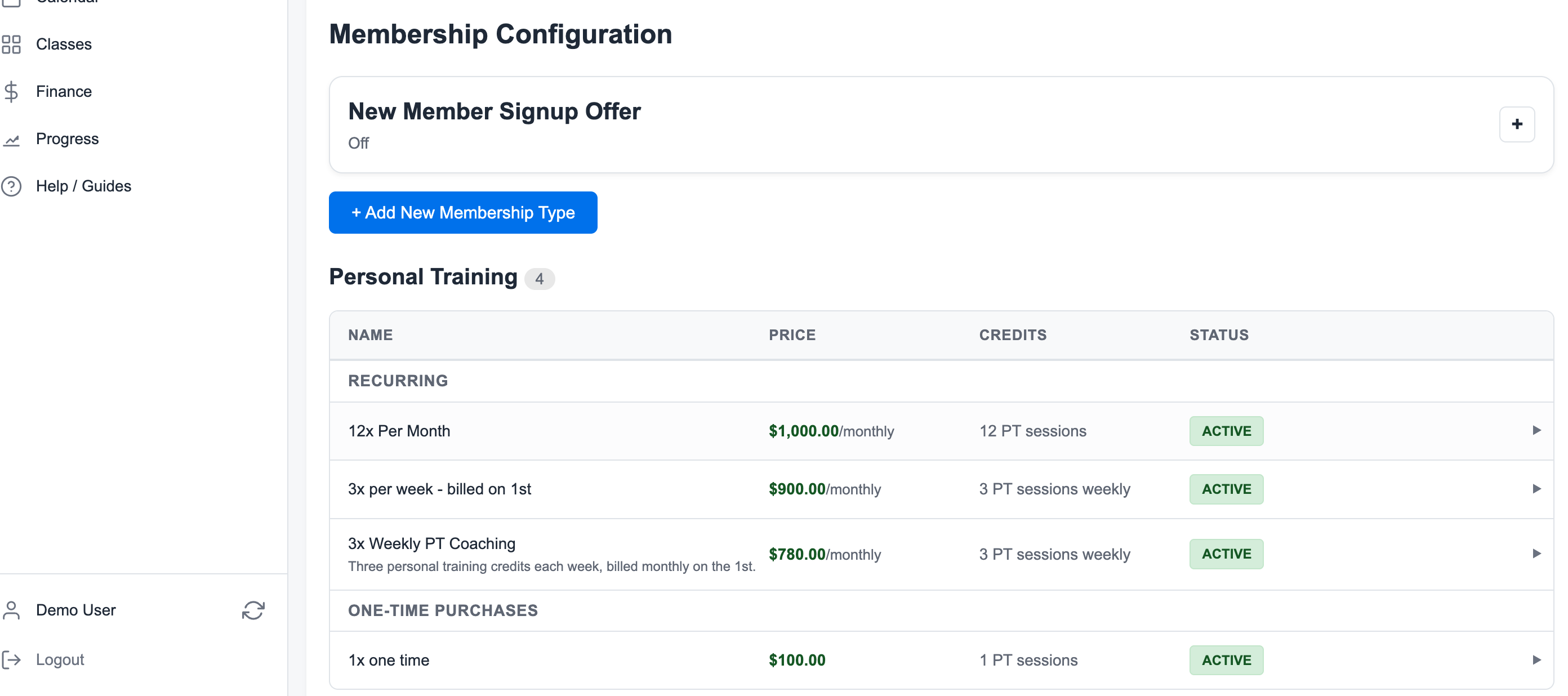
2. Click Add New Membership Type
Click + Add New Membership Type.
3. Choose the Credit Type
Choose whether the package grants:
- Personal training credits
- Class credits
This choice controls where the credits can be used.
4. Set Price and Billing
Choose the offer type that matches what the member is buying:
- One-time package for packs like 10 sessions
- Recurring monthly for a normal monthly membership
- Fixed-weekly credits with monthly billing when members should receive credits weekly but pay on a predictable monthly date
For example, a 3x per week - billed on 1st plan can bill monthly on the 1st while granting 3 PT credits each week.
5. Add Restrictions When Needed
Use restrictions when the membership should only work for certain trainers or class types.
Examples:
- A trainer-specific PT package
- A doubles PT package restricted to a private class type
- A class pass that only works for a specific program
6. Save and Review the List
After saving, confirm the membership appears in the correct group with the expected price, credit amount, and active status.
Related guides:
Ready to streamline your gym?
Start managing bookings, personal training, and memberships in minutes.
Start Your Free Trial →No credit card required